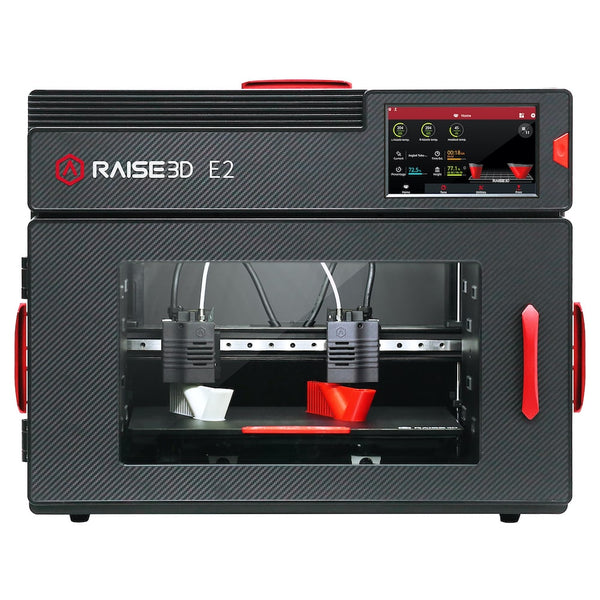
Raise3DRaise3D E2 IDEX Independent Dual Extruder 3D Printer
From руб166.000,00 руб249.100,00
View product ↗︎Free fast shipping on most orders over $199. Eligibility varies by product. Shipping details ↗
We accept purchase orders from Education, Government and Business customers.
Discuss a purchase order ↗︎Found a lower eligible price? Review our guarantee and request a match.
See terms ↗︎When you purchase from 3D Printers Depot®, a premium authorized retailer, your purchase includes the official manufacturer warranty and lifetime technical support.
Price Guarantee: We provide all 3D printers with the lowest price in the USA. So if you find a lower price from an online retailer on an identical, in-stock product, tell us and we'll match the price.
Maximize access and engagement in any classroom with two 3D printers.

3D printing in the classroom isn’t just about the 3D printer. It’s about the curriculum, the projects, and knowledge that surrounds it. That’s why we include 3D printer training, design thinking curriculum, and easy access to lesson plans and projects. Plus enough filament to print all your students’ projects.
Kick off a 3D printing program in your school with enough printers to handle a full classroom’s worth of printing.
With ISTE-certified 3D printer training and design thinking curriculum, educators can prove their expertise in 3D printing and stand out as STEM education leaders.
Self-paced, interactive training. This certification prepares your students for 3D printing and career-building skills that go beyond the classroom.

Two 3D printers allow more students to engage with the technology at the same time. They can work in smaller groups, maintaining higher levels of interest and increasing the educational benefits of 3D printing.
Your MakerBot Sketch 3D printer is versatile and can be used almost anywhere in the classroom. With that in mind, the placement of your printer(s) can have an impact on its use during your lessons.
 Trusted by more than 10,000 schools around the world

Discover how 3D printing with MakerBot is transforming classrooms around the world.
"MakerBot gives us the perfect platform for students to learn the concepts of 3D printing."
Prof. Faridodin (Fredi) Lajvardi
President and CEO of Si Se Puede
“The importance of 3D printing in the classroom is that not only can we design something, we can do successive prototypes to come up with an end product.”
Prof. Rahul Chopra
Technological Education Teacher
“Our students are really thinking about how 3D printing can play a role within their everyday lives and how they can use this technology in the real world.”
Prof. Mary Bowden
Richmond Hill Middle School

We believe that every teacher has the potential to be a 3D printing champion in their district. Our solutions empower educators to unleash their creativity and explore innovative teaching methods, ultimately benefiting students and the entire district.
Our solutions provide opportunities for every student within a district to explore and grow with 3D printing while providing every teacher with the support and resources they need to launch 3D printing successfully in the classroom.

Equip students with practical skills in creative problem solving, digital fabrication, and give them a competitive edge in a technology-driven job market that will fuel their future success.
We believe that every teacher has the potential to be a 3D printing champion in their district. Our solutions empower educators to unleash their creativity and explore innovative teaching methods, ultimately benefiting students and the entire district.
Our solutions seamlessly integrate into district-wide educational systems, simplifying implementation for administrators and ensuring that teachers can embrace 3D printing without barriers.
Ensure your students have a jumpstart on their career paths after they leave your school. Experience with 3D printing and 21st-century technologies provides students with valuable skills in problem-solving, critical thinking, creativity, and digital literacy, skills transferable to many careers in today’s rapidly evolving job market.

3D Printing for Every Scale of Learning – From Classrooms to Entire School Districts
Perfect for introducing students to 3D printing in a single subject or maker lab.
The easiest way to bring 3D printing into your teaching.
A single MakerBot Sketch printer can spark student creativity and introduce design thinking, STEM concepts, and hands-on learning in a safe, easy-to-use format. With quick setup, built-in lesson plans, and teacher training, it’s perfect for small projects, prototypes, and bringing ideas to life—without adding extra workload
Multiple printers across classrooms or a centralized lab serving different subjects.
Multiple printers. More students. Bigger ideas.
Sharing 3D printing across classrooms or a STEM lab multiplies learning opportunities. A mix of Sketch and Sketch Sprint printers enables faster turnaround, larger build volumes, and simultaneous projects—supporting science models, history replicas, and prototypes while fostering collaboration and creativity school-wide.
Standardized 3D printing across schools for shared resources, and unified training.
Transform Learning at Scale.
A district-wide 3D printing program gives every student equal access to cutting-edge technology and a consistent learning experience. Standardizing on Sketch Sprint and Sketch printers keeps projects moving without bottlenecks, building problem-solving skills and hands-on STEM experience at scale.


Printers, Training + Classroom Management Tools, Support Every Step of the Way
MakerBot Sketch Printers are designed to work with teachers & students of all skill levels and integrate seamlessly into their classrooms.
We support every teacher in their 3D printing journey by including printer training and design thinking curriculum to guarantee your teachers can start printing on day one.

We empower students to be the driving force behind the design thinking process, encouraging them to identify problems, innovate solutions, and bring them to life through 3D printing.
We make the classroom 3D printing experience easier for every teacher by incorporating classroom

“Reliability was obviously a big factor, we didn’t want to bring something in that would fail – but we knew we’d be successful with MakerBot.”
Dr. Joseph Putrino
Principal, Glenfield Middle School
| General | |
| Print Technology | Fused Deposition Modelling |
| Build Volume | 150mm x 150mm x 150mm (5.9 x 5.9 x 5.9 inches) |
| Layer Resolution |
100-400 microns
(0.0039 – 0.0157 inches) Print mode tuned for 200 microns |
| Material Diameter | 1.75 mm (0.069 inches) |
| Material Compatibility |
MakerBot Sketch PLA Material
|
| Extruder Compatibility | MakerBot Sketch Extruder |
| Nozzle Diameter | 0.4 mm (0.015 inches) |
| Print File Type | .MAKERBOT |
| Temperature | |
| Ambient Operating Temperature | 15-30°C (59-86°F) |
| Storage Temperature | 0-55°C (32-131°F) |
| Size & weight | |
| Product Dimensions |
547mm (H) x 535mm (W) x 470mm (D)
21.54in (H) x 21.07in (W) x 18.5in (D) |
| Shipping Box |
549mm (H) x 517mm (W) x 46mm (D)
21.625in (H) x 20.375in (W) X 18.25in (D) |
| Product Weight | 11.8 kg (26 lb) |
| Shipping Weight | 17kg (37.5 lb) |
| Mechanical | |
| Build Surface | Grip Surface |
| Build Plate Leveling |
Heated with removable flexible build surface
|
| Safety & compliance | |
| Safety |
Fully enclosed
Particulate Filter UL, CE, FCC IEC/ EN/ UL60950-1, IEC/ EN/UL 62368-1 |
| Software | |
| Software Bundle | MakerBot CloudPrint |
| Supported File Types |
MakerBot (.makerbot)STL (.stl)SolidWorks (.sldprt, .sldasm)InventorOBJ (.ipt, .iam)IGES (.iges, .igs)STEP AP203/214 (.step, .stp)
|
| Operating Systems |
Windows (7, 10)Mac OS X (10.12+) Note: Does not support Mac Catalina
|
| Electrical | |
| Power Requirements |
100-240 V, 50-60 HZ2.7-1.3A
|
| Connectivity | USB, Ethernet, Wifi |
| Camera | |
| Camera resolution | 2 megapixels |
| Sketch Single Best for small size projects in a classroom |
Sketch Classroom Bundle
Double your printing capacity and print more in half the time. |
|
Printer: 1 Sketch Standard |
Printer: 2 Sketch Standard |
|
Student certification: 5 seats Educator certification: 1 seats |
Student certification: 10 seats Educator certification: 2 seats |
|
Material: 3 spools |
Material: 6 spools |
|
Combined build volume: 205 inch³ |
Combined build volume: 410 inch³ |
Mon–Fri · 9am–6pm PST
Large machines may require freight delivery and suitable unloading equipment. Check the dimensions and shipping weight in the specifications, then confirm any access or appointment requirements with us.
Shipping costs and eligibility depend on the product and destination. Lead times depend on supplier stock, dispatch, carrier service and, for international shipments, customs. Checkout shipping rates are not a delivery-date guarantee. Contact us before ordering if you have a deadline. Shipping information ↗︎
Manufacturer coverage varies by product. Review the product specifications and contact our support team for model-specific warranty details, parts and service assistance.
Education, Government and Business customers can request a quote and submit procurement requirements to our team. Include the product, quantity, organization and delivery ZIP code. Contact us ↗︎
Need a detail confirmed? Send your question to our team. We’ll reply by email.
New machines. Useful ideas. Offers worth opening. For your first print—and your next big leap.